Published
- 14 min read
Stop Using Service Account Keys: A Guide to Workload Identity Federation

For years, there has been a dirty little secret in the world of cloud automation and CI/CD: the service account key. This humble JSON file, containing a long-lived, static private key, has been the de facto standard for authenticating workloads and pipelines to Google Cloud. We download them, store them as secrets in GitHub or GitLab, and use them to power our automated deployments. And in doing so, we have created a ticking time bomb at the heart of our security posture.
Leaked service account keys are one of the most common and devastating causes of cloud breaches. A single key, accidentally committed to a public Git repository, is all an attacker needs to gain direct, persistent access to your cloud environment.
It’s time for a better way. Google Cloud offers two identity solutions that serve distinct purposes: Workload Identity Federation (WIF) for machine-to-machine authentication, and Workforce Identity Federation for human user access. This post focuses on WIF the keyless, short-lived credential model that replaces static service account keys while also clarifying how it differs from Workforce Identity so you can make the right architectural choices. This is the developer’s definitive, no-nonsense guide to understanding the risks of JSON keys and making the switch to a more secure, keyless future with WIF.
The Original Sin: Why Service Account Keys Are So Dangerous
Before we dive into the solution, we must be brutally honest about the problem. Service account keys are a security anti-pattern for several critical reasons:
- They are Long-Lived: By default, a service account key never expires. A key created today will still be valid years from now unless it is manually rotated or deleted.
- They are Static Credentials: The key is a static file. Once it’s created and distributed, you have no control over where it’s copied, stored, or backed up. It becomes a piece of “secret sprawl” that is nearly impossible to track.
- They are a High-Value Target: Attackers are continuously scanning public repositories for accidentally committed keys. A leaked key is a direct, authenticated entry point into your cloud environment.
- Rotation is a Nightmare: Manually rotating keys across dozens of CI/CD pipelines, applications, and developer machines is a complex, error-prone process that is often neglected, leaving old, potentially compromised keys active for far too long.
We have been treating these powerful credentials like simple configuration files, and it has created a massive, systemic risk across the industry.
The Keyless Revolution: How Workload Identity Federation Works
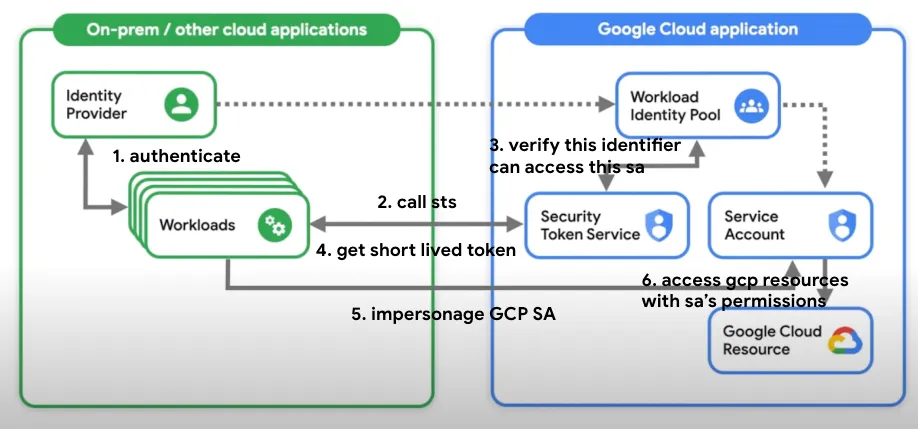
Workload Identity Federation allows external workloads like a GitHub Actions runner, a GitLab pipeline, or an application running on AWS or Azure to impersonate a GCP service account without needing a service account key.
Instead of exchanging a long-lived, static key, it uses a secure, short-lived token exchange based on trusted, verifiable identities.
Here’s a simplified breakdown of the flow, using a GitLab CI/CD pipeline as an example:
- The External Identity Provider (IdP): Your CI/CD platform (GitLab, in this case) acts as an external Identity Provider. When it runs a pipeline, it can generate a unique, short-lived, and auditable identity token (typically a JSON Web Token or JWT). This JWT contains verifiable claims, such as the Git repository, the branch, and the commit SHA the pipeline is running for.
- The Trust Configuration (The One-Time Setup): In GCP, you create a Workload Identity Pool and a Provider. This is where you establish a trust relationship. You are essentially telling GCP: “I trust tokens that are issued by
gitlab.com. Specifically, I trust tokens that have anaud(audience) claim matching this project, and asub(subject) claim matching this specific Git repository.” - The Token Exchange: a. Your GitLab pipeline requests its unique JWT from GitLab’s OIDC provider. b. The pipeline then calls the GCP Security Token Service (STS), presenting this GitLab-issued JWT. c. The STS validates the token. It checks the issuer, the audience, and the subject claims against the trust configuration you created in your Workload Identity Pool.
- The Short-Lived GCP Token: If the trust is verified, the STS returns a short-lived GCP access token. This token is valid for a limited time (typically one hour) and can be used to call GCP APIs.
- Impersonation: The pipeline uses this short-lived GCP token to impersonate a designated GCP service account, inheriting its permissions for the duration of the job.
The result? The CI/CD pipeline has the access it needs to deploy resources, but there is no static JSON key stored in GitLab, no secret to be leaked, and no long-lived credential to be forgotten. The entire process is dynamic, auditable, and secure by default.
Where Workload Identity Federation Fits Best
Google documents WIF for AWS and Azure VMs, OIDC and SAML-based providers, and deployment pipelines such as GitHub Actions, GitLab SaaS, and Azure DevOps. The pattern is always the same: trust the external workload identity, exchange it for short-lived Google credentials, and avoid static secrets.
There is also a GKE-specific variant. Workload Identity Federation for GKE lets Kubernetes workloads in GKE access Google Cloud APIs without service account key files or manual credential distribution. Google manages the workload identity pool and provider for you, and on Autopilot clusters this capability is always enabled.
Two main access patterns exist. Direct access grants IAM roles to federated principals from a workload identity pool. Service account impersonation lets the external workload act as a Google service account. Most teams adopt impersonation because it fits existing IAM designs and Google auth libraries.
When to Use Workload Identity
- Applications running in GKE that need to access GCP resources
- Granting access to GCP resources for applications running outside GCP without managing service account keys
- Simplifying credential management for Kubernetes workloads
- Enhancing security by eliminating the need for long-lived service account keys
- CI/CD pipelines (GitHub Actions, GitLab, Azure DevOps) deploying to GCP
What Is Workforce Identity?
While Workload Identity Federation handles machine-to-machine authentication, Workforce Identity Federation is designed for human users. It allows organizations to use their existing identity provider such as Okta, Google Workspace, or Active Directory to manage and authenticate users accessing Google Cloud resources.
Key Features
- Integrates with your existing identity provider (IdP)
- Provides single sign-on (SSO) capabilities
- Enables fine-grained access control based on user attributes or context
- Supports SAML and OIDC protocols for federation
Real-Life Use Case: Integration with Okta
A company uses Okta as its identity provider. By integrating Okta with Workforce Identity, employees use their Okta credentials to access Google Cloud resources seamlessly.
- Set Up Identity Federation: In the Google Cloud Console, go to IAM & Admin > Identity Federation. Add an OIDC or SAML provider configured with your Okta details (issuer URL, client ID).
- Create Workforce Pools: Create a Workforce Pool that maps Okta identities to Google Cloud IAM roles.
- Assign IAM Roles: Add identities from your Workforce Pool and assign the necessary IAM roles.
- Configure Okta: Set up a new application in Okta for Google Cloud, configuring it to issue tokens that Google Cloud accepts.
Employees can then use their Okta credentials to access Google Cloud, enabling centralized access management.
When to Use Workforce Identity
- Managing access for human users in your organization
- Implementing SSO for GCP resources
- Applying fine-grained access controls based on user attributes
- Leveraging existing identity providers (Okta, Google Workspace, Active Directory) for unified access management
Key Differences: Workload Identity vs. Workforce Identity
Understanding the distinction is critical for choosing the right approach.
| Aspect | Workload Identity Federation | Workforce Identity Federation |
|---|---|---|
| Purpose | Machine-to-machine authentication (applications, services, CI/CD pipelines) | Human user access management |
| Use Cases | GKE workloads, AWS/Azure VMs, GitHub/GitLab pipelines accessing GCP | Employees accessing GCP with corporate credentials |
| Integration | Kubernetes service accounts, cloud provider identities | External IdPs (Okta, Active Directory, Google Workspace) |
| Protocols | OIDC, SAML | SAML, OIDC |
| Credentials | Short-lived tokens, no static keys | SSO, MFA, conditional access |
| Security Focus | Eliminates service account keys, claim-bound access | Reduces password fatigue, centralized identity management |
The critical distinction: Workforce Identity is for humans signing in with external identity provider credentials. Workload Identity is for workloads that need to operate on Google Cloud resources. Many identity programs fail when they apply user-access assumptions to machine identities.
The Practical Blueprint: How to Set Up Workload Identity Federation with GitLab CI/CD
This isn’t just theory. Let’s walk through a concrete, technical implementation based on the excellent guide from Orange Business.
Step 1: Create the Workload Identity Pool and Provider in GCP
First, you need to set up the trust relationship in your GCP project.
# 1. Create the Workload Identity Pool
gcloud iam workload-identity-pools create "gitlab-pool" \
  --project="your-gcp-project-id" \
  --location="global" \
  --display-name="GitLab Identity Pool"

# 2. Get the full ID of the new pool
gcloud iam workload-identity-pools describe "gitlab-pool" \
  --project="your-gcp-project-id" \
  --location="global" \
  --format="value(name)"

# 3. Create the OIDC Provider within the pool
gcloud iam workload-identity-pools providers create-oidc "gitlab-provider" \
  --project="your-gcp-project-id" \
  --location="global" \
  --workload-identity-pool="gitlab-pool" \
  --display-name="GitLab OIDC Provider" \
  --issuer-uri="https://gitlab.com" \
--attribute-mapping="google.subject=assertion.sub,attribute.project_path=assertion.project_path"--issuer-uri: This tells GCP to trust tokens issued by GitLab.--attribute-mapping: This is a crucial step. It maps the claims from the GitLab JWT to attributes that you can use in your GCP IAM policies. Here, we are mapping the GitLab subject (e.g.,project_path:mygroup/myproject:ref_type:branch:ref:main) to Google’s subject attribute.
Step 2: Create a Dedicated Service Account and Grant Permissions
Create a least-privilege service account that your pipeline will impersonate.
# 1. Create a dedicated service account
gcloud iam service-accounts create "gitlab-deployer-sa" \
  --project="your-gcp-project-id" \
  --display-name="GitLab Deployer SA"

# 2. Grant the WIF user role to the Workload Identity Pool
gcloud iam service-accounts add-iam-policy-binding "[email protected]" \
  --project="your-gcp-project-id" \
  --role="roles/iam.workloadIdentityUser" \
  --member="principalSet://iam.googleapis.com/[WORKLOAD_IDENTITY_POOL_ID]/attribute.project_path/your-group/your-repo"
This is the magic link. The --member flag grants the “Workload Identity User” role to a specific set of principals from your external IdP. In this case, we are saying: “Only identities from the GitLab repository your-group/your-repo are allowed to impersonate this service account.”
Step 3: Configure Your GitLab CI/CD Pipeline (.gitlab-ci.yml)
Now, configure your GitLab pipeline to perform the token exchange.
deploy-to-gcp:
  stage: deploy
  image: google/cloud-sdk:latest
  id_tokens:
    GITLAB_OIDC_TOKEN:
      aud: 'https://iam.googleapis.com/[WORKLOAD_IDENTITY_POOL_ID]'
  script:
    - echo "${GITLAB_OIDC_TOKEN}" > .gitlab-oidc-token.jwt
    - >-
      gcloud auth login --cred-file <(printf '{"type": "external_account",
      "audience": "...",
      "subject_token_type": "urn:ietf:params:oauth:token-type:jwt",
      "token_url": "https://sts.googleapis.com/v1/token",
      "credential_source": { "file": "%s" }}'
      ".gitlab-oidc-token.jwt")
- gcloud projects list # This command now works, authenticated via WIF!id_tokens: This special GitLab CI keyword instructs GitLab to fetch a JWT from its OIDC provider.- The Credential File: You create a configuration file on the fly that tells the
gcloudCLI to use the external account flow, pointing it to the JWT file. gcloud auth login: This command uses the JWT to call the GCP STS and get back a short-lived GCP access token. All subsequentgcloudcommands in the script will now be authenticated.
Security Considerations and Design Decisions
WIF is not just an authentication feature it is a security architecture feature. A mature implementation reduces blast radius, improves least privilege, and strengthens traceability. But a poorly designed rollout can still result in over-broad machine access with better token hygiene but weak governance.
Threat Model: What to Protect Against
Google frames secure WIF around three threat categories:
- Spoofing: Can you trust the claims a workload presents?
- Privilege Escalation: Can you limit what an authenticated workload can do?
- Non-Repudiation: Can you later prove which external identity performed an action?
Design Decisions That Separate Secure From Risky
1. Pool and Provider Structure
Use a dedicated project to manage workload identity pools and providers. Use a single provider per pool to avoid subject collisions. If multiple providers map different external identities to the same google.subject, auditability degrades.
2. Attribute Mapping
Attribute mappings define how external identities become Google Cloud principals. Use immutable and non-reusable attributes. Choose a unique mapping for google.subject so one external identity maps to exactly one subject. This is essential for incident response: can your team answer “which exact external workload performed this action?”
3. Access Scope
- Create a dedicated service account for each application.
- Keep service accounts in the same project as the resources they access.
- Avoid granting
roles/iam.workloadIdentityUserto all members of a pool. Limit impersonation rights to specific external identities.
4. Attribute Conditions for Multi-Tenant Providers
For providers like GitHub, use attribute conditions so tokens are only accepted from a trusted tenant or organization. An issuer can be valid while the token originates from the wrong repository or organization.
Operational Best Practices
- Use credential configuration files pointed to by
GOOGLE_APPLICATION_CREDENTIALSinstead of service account keys for Application Default Credentials outside GCP. - Enable Data Access logs for both the Security Token Service API and the IAM API in projects containing WIF pools or service accounts. Without these logs, you see actions attributed to the impersonated service account but lack the chain showing which external identity initiated it.
- Standardize authentication through Google auth libraries using the federated setup across local development and automation.
The Most Common Mistake
Treating WIF as a narrow “remove keys” project instead of a broader trust-design exercise. Unstable subject mappings, overly broad pool membership, reused service accounts, and duplicate providers create an access model that is difficult to reason about. You may have removed JSON keys, but you have not necessarily built a secure machine-identity system.
Conclusion: It’s Time to Say Goodbye to Keys
The era of the static, long-lived service account key is over. The risks are too great, and the alternative is now too powerful and accessible. Workload Identity Federation provides a secure-by-default, dynamic, and auditable way to manage machine-to-machine authentication that is purpose-built for the modern CI/CD and multi-cloud landscape.
Workload Identity Federation is not just a better authentication mechanism. It is a cleaner trust model for machine access. It replaces static Google credentials with federated, short-lived access. It fits naturally with AWS, Azure, GitHub, GitLab, on-premises OIDC and SAML providers, and GKE workloads.
For a production-ready GitHub Actions implementation, including claim restrictions and failure testing, see the companion setup guide. Pair WIF with GCP IAM privilege-escalation controls and software supply-chain security rather than treating keyless authentication as a complete defense.
When designed well with narrow impersonation rules, strong subject mappings, per-application service accounts, and full audit logging it gives security teams something far more valuable than convenience: it gives them control.
Migrating away from keys requires a deliberate effort, but it is one of the single most impactful security improvements you can make to your cloud environment. It eliminates a massive class of credential-based risks and sets a new, more secure foundation for your automated workflows. It’s time to stop managing secret files and start managing trust.
To further enhance your cloud security and implement Zero Trust, contact me on LinkedIn Profile or [email protected].
Frequently Asked Questions (FAQ)
What is Workload Identity Federation?
It is a GCP feature that allows external workloads like a GitHub Action or a VM on AWS to securely authenticate to GCP and impersonate a service account without needing to use a long-lived service account JSON key.
How is WIF more secure than using a service account key?
It eliminates static, long-lived credentials. Instead of a key that never expires and can be leaked, WIF uses a short-lived token exchange based on a trusted relationship with an external identity provider like GitHub or GitLab. This is a "keyless" authentication method.
Does Workload Identity Federation only work with GitLab?
No. It works with any identity provider that supports OpenID Connect OIDC, including GitHub, AWS, Azure, and many others.
What is an OIDC token?
An OIDC OpenID Connect token is a type of JSON Web Token JWT that is used to prove identity. In the context of WIF, your CI/CD platform like GitLab issues a short-lived OIDC token that contains verifiable information about the specific job, repository, and branch that is running.
Can I restrict which specific GitHub or GitLab repo can use a WIF configuration?
Yes. This is a key security feature. When you grant the "Workload Identity User" role, you can create a condition based on the attributes from the external token, such as the `project_path` from a GitLab JWT. This allows you to enforce a policy like, "Only the main branch of our production repository can impersonate the production deployer service account."
Relevant Resource List
- Google Cloud Documentation: “Workload Identity Federation”
- Medium Article (Google Cloud Community): “Goodbye Service Account Keys!”
- Orange Business - Perspectives Blog: “How to secure your Google Cloud resources from a GitLab CI/CD”
- OpenID Connect (OIDC) Foundation: (For understanding the underlying identity protocol)
