Published
- 16 min read
GCP Workload Identity Federation: GitHub Actions and GitLab Setup

Most teams do not need another secret in their CI/CD system. They need a reliable way to prove which workload is running, where it came from, and what it is allowed to do.
That is the implementation intent behind Google Cloud Workload Identity Federation (WIF). Instead of storing a long-lived Google service-account key in GitHub, GitLab, AWS, or Azure, an external workload presents a short-lived identity assertion to Google Cloud Security Token Service (STS). Google validates the assertion against a workload identity provider, then issues short-lived credentials that can access selected resources or impersonate a service account.
This guide focuses on the decisions that make WIF secure in production. It uses GitHub Actions and GitLab as the primary CI/CD examples, then shows how the same design applies to AWS and Azure workloads.
The commands use placeholders deliberately. Replace them with your project number, pool, provider, service-account, organization, repository, role, and environment values. Test each trust policy with a non-production service account before granting production access.
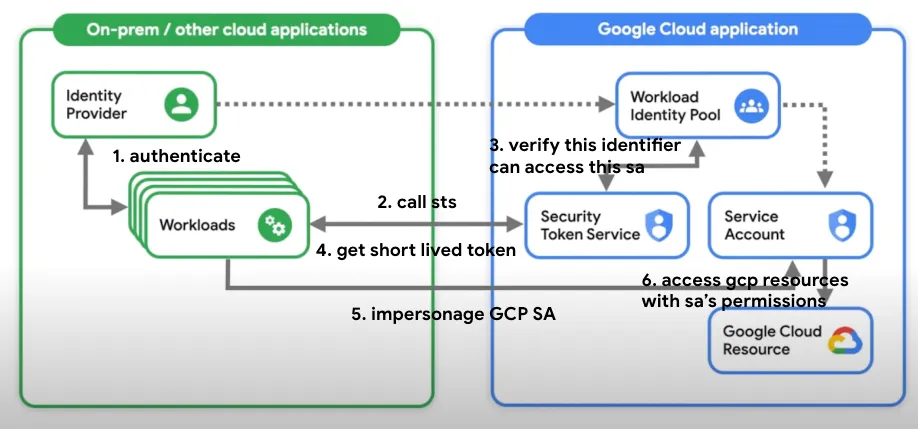
The target architecture
A secure deployment usually contains these components:
- External identity provider: GitHub Actions, GitLab, AWS, or Azure issues an identity assertion for the running workload.
- Workload identity pool: A Google Cloud boundary for external identities. Use separate pools for materially different environments or trust domains.
- Workload identity provider: Defines the issuer, accepted audience, attribute mappings, and CEL attribute condition.
- Federated principal: The external identity after Google maps its claims into
google.subject,google.groups, or custom attributes. - Resource or service account: The federated principal receives a narrow resource role directly, or receives permission to impersonate a dedicated service account.
- Short-lived credentials: STS and, when required, the IAM Service Account Credentials API issue temporary credentials for the job.
The important security boundary is not simply “OIDC enabled.” It is the combination of the provider condition, the principal in the IAM binding, the permissions on the target resource, and the permissions on any impersonated service account.
Workload Identity Federation versus service-account keys
| Property | Service-account key | Workload Identity Federation |
|---|---|---|
| Credential lifetime | Long-lived until manually revoked or rotated | Short-lived and issued for a specific exchange |
| Private key storage | Required in a secret manager, CI/CD secret, workstation, or file | Not required; credential configuration files contain no private key |
| Trust decision | Possession of the key is usually sufficient | Claims, issuer, audience, mappings, and conditions are evaluated |
| Blast radius | Often the full service-account permission set for as long as the key survives | Limited by token lifetime, trust policy, principal binding, and service-account role design |
| Rotation | Manual key creation, distribution, and revocation | Provider and external-token lifecycle are managed by the identity systems |
| Attribution | Key use is commonly recorded only as the service account | Impersonation audit logs can preserve both the external principal and target service account |
| Main failure mode | Key leakage and secret sprawl | Over-broad trust conditions or an over-privileged target identity |
WIF is not automatically safe. A provider that trusts every token from a shared issuer, combined with roles/iam.workloadIdentityUser on a powerful service account, can create a different but still serious access path. Keyless authentication removes private-key exposure; it does not replace least privilege, pipeline isolation, or code-review controls.
For the broader consequences of over-permissioned identities, see GCP IAM privilege escalation. For CI/CD-specific pipeline threats, see The OWASP Top 10 CI/CD Security Risks.
One-time Google Cloud setup
The following setup creates a pool, an OIDC provider suitable for GitHub Actions or GitLab, and a deployment service account. The exact mappings and condition must match the provider you are configuring; do not reuse a GitHub condition for GitLab or vice versa.
Enable the required APIs
gcloud services enable \
  iam.googleapis.com \
  iamcredentials.googleapis.com \
  sts.googleapis.com \
  cloudresourcemanager.googleapis.com \
  --project="${PROJECT_ID}"
Use a dedicated project for pools and providers where practical. Record both the project ID and the project number. IAM principal resource names use the project number.
Create a pool
gcloud iam workload-identity-pools create "cicd-pool" \
  --project="${POOL_PROJECT_ID}" \
  --location="global" \
  --display-name="CI/CD external workloads"

POOL_NAME=$(gcloud iam workload-identity-pools describe "cicd-pool" \
  --project="${POOL_PROJECT_ID}" \
  --location="global" \
  --format="value(name)")

echo "${POOL_NAME}"
Consider separate pools for production and non-production when the environments have different administrators, repositories, or risk tolerances. A single pool is not a substitute for conditions that identify the exact workload.
Create a dedicated deployment service account
gcloud iam service-accounts create "cicd-deployer" \
  --project="${TARGET_PROJECT_ID}" \
  --display-name="Dedicated CI/CD deployer"
Grant this account only the permissions required by the deployment. Avoid broad roles such as Owner or Editor. If the deployment needs to write to one bucket, grant the narrowest suitable storage role on that bucket rather than a project-wide role.
Choose direct access or impersonation
Google recommends direct resource access when the target API supports federated principals. Direct access avoids adding another impersonation hop:
federated principal -> specific resource roleUse service-account impersonation when a product or client library requires a service account identity, or when your existing authorization model is deliberately built around dedicated service accounts:
federated principal -> roles/iam.workloadIdentityUser -> service account -> resource roleThe impersonation binding must target the exact principal or principal set. Do not grant the role to every identity in a pool unless that is an intentional, reviewed design.
GitHub Actions: a production-oriented setup
GitHub Actions supplies an OIDC token for a workflow job when the workflow requests the id-token: write permission. The token contains claims such as the repository, organization, ref, event, environment, workflow, and actor. Your Google provider should map the claims needed for authorization and restrict the accepted organization and repository.
Create the GitHub OIDC provider
The following mapping is a starting point for GitHub-hosted Actions. Review the claims emitted by your workflow and adapt the mapping to your policy.
gcloud iam workload-identity-pools providers create-oidc "github" \
  --project="${POOL_PROJECT_ID}" \
  --location="global" \
  --workload-identity-pool="cicd-pool" \
  --display-name="GitHub Actions" \
  --issuer-uri="https://token.actions.githubusercontent.com" \
  --attribute-mapping="google.subject=assertion.sub,attribute.repository=assertion.repository,attribute.repository_owner=assertion.repository_owner,attribute.ref=assertion.ref,attribute.environment=assertion.environment,attribute.workflow=assertion.workflow" \
  --attribute-condition="assertion.repository_owner == '${GITHUB_ORG}' && assertion.repository == '${GITHUB_ORG}/${GITHUB_REPOSITORY}' && assertion.ref == 'refs/heads/main'"
This condition is intentionally restrictive. If production deployments use a GitHub environment, add an environment claim and require the expected environment. A branch check alone is not enough when workflows can be triggered by pull requests, tags, reusable workflows, or privileged environment rules.
Use the provider’s full audience as the audience requested by the workflow. A common audience is the provider resource:
//iam.googleapis.com/projects/POOL_PROJECT_NUMBER/locations/global/workloadIdentityPools/cicd-pool/providers/githubThe accepted audience and the workflow’s requested audience must agree. If your organization uses a different audience convention, configure it explicitly on both sides.
Allow only the intended GitHub principal to impersonate
For a subject-based binding, use the exact mapped subject. For a repository or custom attribute binding, use a fully qualified principalSet and the project number:
gcloud iam service-accounts add-iam-policy-binding \
  "cicd-deployer@${TARGET_PROJECT_ID}.iam.gserviceaccount.com" \
  --project="${TARGET_PROJECT_ID}" \
  --role="roles/iam.workloadIdentityUser" \
  --member="principalSet://iam.googleapis.com/projects/${POOL_PROJECT_NUMBER}/locations/global/workloadIdentityPools/cicd-pool/attribute.repository/${GITHUB_ORG}%2F${GITHUB_REPOSITORY}"
The exact encoding and principal syntax should be generated or verified with the current Google Cloud documentation. If you need branch or environment-level authorization, enforce those properties in the provider condition rather than relying on a repository-only service-account binding.
Configure the workflow
The official google-github-actions/auth action can use Workload Identity Federation. The workflow still needs least-privilege permissions and should pin third-party actions according to your supply-chain policy.
name: Deploy

on:
  push:
    branches: [main]

permissions:
  contents: read
  id-token: write

jobs:
  deploy:
    runs-on: ubuntu-latest
    environment: production
    steps:
      - uses: actions/checkout@v4

      - id: auth
        uses: google-github-actions/auth@v2
        with:
          workload_identity_provider: projects/${{ vars.GCP_POOL_PROJECT_NUMBER }}/locations/global/workloadIdentityPools/cicd-pool/providers/github
          service_account: cicd-deployer@${{ vars.GCP_TARGET_PROJECT_ID }}.iam.gserviceaccount.com

      - name: Deploy
        run: gcloud run deploy example-service --source . --project "${{ vars.GCP_TARGET_PROJECT_ID }}"
The action exchanges the GitHub OIDC assertion for short-lived Google credentials. Do not add a JSON service-account key as a fallback. If the job fails, diagnose the issuer, audience, mapped claims, condition, principal binding, and target service-account permissions separately.
GitHub-specific security decisions
- Require a specific organization, not just
token.actions.githubusercontent.com. - Restrict the repository to the intended
ORG/REPOSITORY. - Restrict production to a protected branch, tag, or environment.
- Use GitHub environment protection rules for approvals and deployment branches.
- Treat reusable workflows and pull-request workflows as separate trust decisions.
- Do not let untrusted fork code run in a job that has
id-token: writeand production permissions. - Pin third-party actions to trusted commit SHAs when your supply-chain policy requires it.
- Use a separate service account for each application or deployment boundary.
GitLab CI/CD: issuer, audience, and project claims
GitLab SaaS jobs can request OIDC ID tokens through the id_tokens keyword. GitLab tokens expose claims such as project_path, namespace_path, ref, ref_type, environment, and sub. Map the claims that express your authorization boundary and restrict the GitLab group or project in the provider condition.
Create the GitLab OIDC provider
gcloud iam workload-identity-pools providers create-oidc "gitlab" \
  --project="${POOL_PROJECT_ID}" \
  --location="global" \
  --workload-identity-pool="cicd-pool" \
  --display-name="GitLab SaaS" \
  --issuer-uri="https://gitlab.com" \
  --attribute-mapping="google.subject=assertion.sub,attribute.project_path=assertion.project_path,attribute.namespace_path=assertion.namespace_path,attribute.ref=assertion.ref,attribute.ref_type=assertion.ref_type,attribute.environment=assertion.environment" \
  --attribute-condition="assertion.namespace_path == '${GITLAB_GROUP}' && assertion.project_path == '${GITLAB_PROJECT_PATH}' && assertion.ref == 'main' && assertion.ref_type == 'branch'"
GitLab uses a shared issuer URL across organizations. Trusting only https://gitlab.com is therefore insufficient. The condition must identify your group and project, and production should normally restrict the branch and environment as well.
Bind the GitLab principal
gcloud iam service-accounts add-iam-policy-binding \
  "cicd-deployer@${TARGET_PROJECT_ID}.iam.gserviceaccount.com" \
  --project="${TARGET_PROJECT_ID}" \
  --role="roles/iam.workloadIdentityUser" \
  --member="principalSet://iam.googleapis.com/projects/${POOL_PROJECT_NUMBER}/locations/global/workloadIdentityPools/cicd-pool/attribute.project_path/${GITLAB_PROJECT_PATH}"
Keep the provider condition as the primary branch, project, and environment guard. The IAM binding determines who may impersonate the account; it should not be broader than the provider’s intended trust boundary.
Configure .gitlab-ci.yml
deploy:
  image: google/cloud-sdk:slim
  stage: deploy
  rules:
    - if: '$CI_COMMIT_BRANCH == "main" && $CI_ENVIRONMENT_NAME == "production"'
  environment: production
  id_tokens:
    GITLAB_OIDC_TOKEN:
      aud: 'https://iam.googleapis.com/projects/POOL_PROJECT_NUMBER/locations/global/workloadIdentityPools/cicd-pool/providers/gitlab'
  script:
    - printf '%s' "$GITLAB_OIDC_TOKEN" > "$CI_PROJECT_DIR/gitlab-oidc-token.jwt"
    - |
      cat > "$CI_PROJECT_DIR/google-wif.json" <<EOF
      {
        "type": "external_account",
        "audience": "//iam.googleapis.com/projects/POOL_PROJECT_NUMBER/locations/global/workloadIdentityPools/cicd-pool/providers/gitlab",
        "subject_token_type": "urn:ietf:params:oauth:token-type:jwt",
        "token_url": "https://sts.googleapis.com/v1/token",
        "credential_source": {
          "file": "$CI_PROJECT_DIR/gitlab-oidc-token.jwt"
        },
        "service_account_impersonation_url": "https://iamcredentials.googleapis.com/v1/projects/-/serviceAccounts/cicd-deployer@TARGET_PROJECT_ID.iam.gserviceaccount.com:generateAccessToken"
      }
      EOF
    - export GOOGLE_APPLICATION_CREDENTIALS="$CI_PROJECT_DIR/google-wif.json"
    - gcloud auth login --cred-file="$GOOGLE_APPLICATION_CREDENTIALS"
    - gcloud projects describe "$TARGET_PROJECT_ID"
The credential configuration file is not a service-account key: it contains the provider and token-exchange instructions, not a private key. Protect the temporary token file from logs and from later pipeline steps that do not need it, and delete temporary files when the job completes.
AWS: federation from EC2 roles
AWS federation is not identical to GitHub or GitLab OIDC. For common EC2 workloads, Google can validate AWS temporary credentials by using a signed AWS GetCallerIdentity request. The credentials normally come from an EC2 instance profile or another AWS IAM role; the AWS secret key is not sent to Google as a reusable Google credential.
A typical AWS provider uses AWS mappings such as:
google.subject=assertion.arn
attribute.account=assertion.account
attribute.aws_role=assertion.arn.extract('assumed-role/{role_name}/')
Restrict the provider to the expected AWS account and role:
assertion.arn.startsWith('arn:aws:sts::AWS_ACCOUNT_ID:assumed-role/EC2_ROLE_NAME/')Create a credential configuration using the Google Cloud CLI rather than hand-writing the AWS subject-token format:
gcloud iam workload-identity-pools create-cred-config \
  "projects/${POOL_PROJECT_NUMBER}/locations/global/workloadIdentityPools/cicd-pool/providers/aws" \
  --service-account="cicd-deployer@${TARGET_PROJECT_ID}.iam.gserviceaccount.com" \
  --aws \
  --output-file="google-wif-aws.json"

export GOOGLE_APPLICATION_CREDENTIALS="$PWD/google-wif-aws.json"
gcloud auth application-default print-access-token
On AWS, protect the instance role and metadata service just as carefully as the Google-side provider. A compromised EC2 workload can still use its valid AWS role to obtain Google credentials if the provider trusts that role.
Azure: federation from managed identities
Azure VM workloads commonly use a system-assigned or user-assigned managed identity to obtain an Azure access token. Google Cloud exchanges that Azure identity assertion for short-lived Google credentials after the Azure tenant, issuer, audience, and mapped subject satisfy the provider configuration.
A provider-specific mapping and condition should identify the expected Microsoft Entra tenant and managed identity. For example, map a stable identity claim to google.subject and restrict the tenant or application identifier in the provider condition:
google.subject=assertion.sub
attribute.tenant=assertion.tid
attribute.application=assertion.appid

assertion.tid == 'AZURE_TENANT_ID' && assertion.appid == 'AZURE_MANAGED_IDENTITY_APP_ID'
Generate the credential configuration with the Google Cloud CLI and use the Azure subject-token source supported by the current Google Cloud documentation:
gcloud iam workload-identity-pools create-cred-config \
  "projects/${POOL_PROJECT_NUMBER}/locations/global/workloadIdentityPools/cicd-pool/providers/azure" \
  --service-account="cicd-deployer@${TARGET_PROJECT_ID}.iam.gserviceaccount.com" \
  --azure \
  --app-uri="https://app.iamcredentials.googleapis.com/" \
  --output-file="google-wif-azure.json"

export GOOGLE_APPLICATION_CREDENTIALS="$PWD/google-wif-azure.json"
gcloud auth application-default print-access-token
Use separate managed identities for separate applications or environments. Do not treat “running on an Azure VM” as an authorization boundary: the Google provider must still distinguish the intended tenant and identity.
Common trust-condition mistakes
1. Trusting the issuer but not the tenant or organization
GitHub and GitLab use shared public issuer URLs. The issuer proves where a token was issued, not that it belongs to your organization. Require the organization, group, project, or repository claim in the provider condition.
2. Trusting an entire repository
A repository condition can still be too broad. Ask whether every branch, tag, workflow, event, and environment in that repository should impersonate the production service account. Usually the answer is no. Add protected branch, environment, workflow, or event restrictions where the provider exposes those claims.
3. Using a mutable or ambiguous subject
google.subject must identify one external identity uniquely and is limited to 127 characters. Avoid display names, branch names alone, or values that can be reused across providers. Prefer a stable provider subject combined with mapped attributes and conditions.
4. Referencing an attribute that was never mapped
Every custom attribute used by a CEL condition or IAM principal set must be present in the provider’s attribute mapping. A condition such as attribute.project_path == ... cannot work if attribute.project_path was not mapped from the assertion.
5. Getting the audience wrong
The external token’s audience, the provider’s accepted audience, and the credential configuration’s audience must agree. Audience errors are often reported as generic token-exchange failures, so verify the complete provider resource name and whether your configuration expects the https: prefix.
6. Mixing project ID and project number
Google resource names for workload identity principals use the numeric project number. The project ID is used in many gcloud flags and service-account email addresses. Record both values and label shell variables explicitly.
7. Granting access to every identity in a pool
A pool is a trust container, not an authorization role. Avoid bindings such as an unqualified pool-wide principalSet for sensitive resources. Bind the exact subject or a narrowly scoped custom attribute.
8. Confusing authentication with authorization
A valid token only proves that the provider accepted the external identity. The target IAM role still determines what the workload can do. Review both the resource role and any roles/iam.workloadIdentityUser binding.
9. Giving WIF access to an over-privileged service account
Replacing a key with WIF does not make roles/owner, broad IAM administration, or unrestricted service-account impersonation safe. Use a dedicated service account and review permissions such as iam.serviceAccounts.actAs, iam.serviceAccounts.getAccessToken, iam.serviceAccountKeys.create, and setIamPolicy.
10. Assuming WIF prevents a compromised pipeline
WIF prevents a stolen static key from being reused indefinitely, but a malicious step can request a valid token while the job is running. Protect workflow files, review pull requests, isolate production environments, pin actions and dependencies, and restrict the claims accepted by Google.
A practical debugging checklist
| Symptom | Checks |
|---|---|
invalid audience | Compare the workflow aud, provider audience, credential config, and provider resource name. |
attribute condition failed | Decode a test token safely, confirm claim names and values, and verify every condition field is mapped. |
principal not found | Use the pool project number, correct pool/provider IDs, URL-encode special characters, and verify the mapped subject or attribute. |
| STS succeeds but API calls fail | Review the direct resource role or the impersonated service account’s roles. |
| Impersonation is denied | Check the roles/iam.workloadIdentityUser binding on the target service account and the exact external principal. |
| Unexpected production access | Audit branch, tag, environment, workflow, repository, group, tenant, and pool-wide bindings. |
| Logs show only the service account | Confirm impersonation and Data Access audit logging; direct key authentication does not preserve the same initiating identity chain. |
Test the complete path with a harmless read-only permission before adding deployment permissions. Then verify a negative case: a different repository, branch, environment, AWS role, or Azure identity should fail the token exchange or authorization step.
WIF and the rest of the security program
WIF should be one control in a larger identity and software supply-chain design:
- Use dedicated service accounts and narrow resource-level roles.
- Disable service-account key creation where organization policy allows it.
- Monitor STS, IAM Credentials, and target-service audit logs.
- Review who can modify workflow files, pipeline definitions, providers, service accounts, and IAM policies.
- Protect production environments with approvals and branch restrictions.
- Use IAM Deny policies and organization policies as defense-in-depth controls.
- Treat build runners, dependencies, actions, and container images as part of the deployment trust boundary.
For an example of what an over-permissioned deployment identity can expose, read GCP Storage Security: Guide to Preventing Silent Takeovers. For broader pipeline and dependency controls, see Defending the Software Supply Chain and The OWASP Top 10 CI/CD Security Risks.
Conclusion
The practical case for Workload Identity Federation is simple: external workloads should prove their identity when they run, receive only short-lived credentials, and access only the Google Cloud resources they need.
The hard part is designing the trust boundary. GitHub and GitLab require organization, repository, ref, workflow, and environment thinking. AWS requires careful control of the account and role behind signed GetCallerIdentity requests. Azure requires stable tenant and managed-identity claims. Every provider requires narrow IAM bindings and a service account that is no more powerful than the deployment requires.
If your current design is “store a service-account JSON key in CI/CD,” begin by inventorying what that key can do. Create a dedicated pool, provider, and service account. Test a restrictive condition. Migrate one workload. Revoke the old key only after logs confirm that the new path works.
Keyless authentication is the starting point. Correct claim design, least privilege, pipeline integrity, and continuous audit are what make it secure.
To further enhance your cloud security and implement Zero Trust, contact me on LinkedIn Profile or [email protected].
Frequently Asked Questions (FAQ)
Is Workload Identity Federation always safer than a service-account key?
WIF removes the long-lived private key and limits credentials to a short-lived exchange, but it is not automatically safe. Over-broad provider conditions, pool-wide IAM bindings, compromised workflows, and over-privileged service accounts can still create serious risk.
Should GitHub Actions use a branch condition or an environment condition?
Use the strongest boundary that matches your deployment model. A protected production environment can provide an additional approval and branch-control layer; the Google provider should still restrict the repository and the claims that identify the intended production workload.
What is the main difference between GitHub Actions and GitLab WIF setup?
Both use OIDC assertions, but their issuers, claim names, audiences, and subject formats differ. GitHub commonly uses repository, ref, workflow, and environment claims, while GitLab commonly uses project_path, namespace_path, ref, ref_type, and environment claims. Do not copy mappings or conditions between them without validating the token claims.
Do AWS and Azure workloads use the same OIDC flow as GitHub?
Not necessarily. Google Cloud supports AWS-specific federation using signed GetCallerIdentity requests and Azure federation using managed-identity tokens. Use the provider-specific Google Cloud credential configuration rather than assuming every external cloud produces a GitHub-style JWT.
Does WIF remove the need for service accounts?
No. WIF can grant a federated principal direct access to supported resources, or it can let that principal impersonate a service account. Service accounts remain useful as dedicated, auditable authorization identities, but they should not be backed by long-lived keys.
Can a compromised CI/CD job still abuse WIF?
Yes. A running job that satisfies the provider condition may obtain a valid short-lived token. Reduce the impact with protected environments, narrow claims and roles, separate deployment identities, action and dependency pinning, review controls, short token lifetimes, and audit monitoring.
