
The Model Context Protocol (MCP) is rapidly becoming the standard connective tissue for the AI ecosystem. It allows LLMs and agents to reach outside their chat windows to query databases, manipulate files, and interact with SaaS APIs.
But connecting an autonomous intelligence to your internal infrastructure creates a massive new attack surface. If an MCP server is compromised, it’s not just a data leak it’s a potential Remote Code Execution (RCE) event or a “Confused Deputy” attack where the AI is tricked into performing unauthorized actions on behalf of a user.
In February 2026, OWASP released “A Practical Guide for Secure MCP Server Development.” We have distilled this 17-page document into actionable strategies and a master cheat sheet to help you build and deploy MCP servers securely.
What to Remember
- Isolation First: Run MCP servers in restrictive Docker containers to prevent local system compromise.
- Kill Token Passthrough: Use OAuth delegation instead of passing raw tokens to maintain audit trails and security boundaries.
- Verify Tools: Use signed manifests and strict schema validation to prevent “Rug Pull” attacks on tool definitions.
- Human-in-the-Loop: For high-stakes actions, require explicit user confirmation to mitigate prompt injection risks.
The New Vulnerability Landscape
MCP servers are distinct from traditional APIs because they operate with high autonomy and often chain multiple tool calls. The OWASP guide highlights unique threats:
- Tool Poisoning & “Rug Pulls”: An attacker modifies a tool’s description or functionality in real-time. The LLM, trusting the initial description, invokes the tool, which now executes malicious logic.
- The Confused Deputy: The MCP server uses a user’s credentials to perform actions the user didn’t intend or shouldn’t be allowed to do.
- Memory Poisoning: Corrupting the agent’s short-term context or vector database, causing it to make flawed decisions based on false “memories.”
1. Architecture: Isolation is King
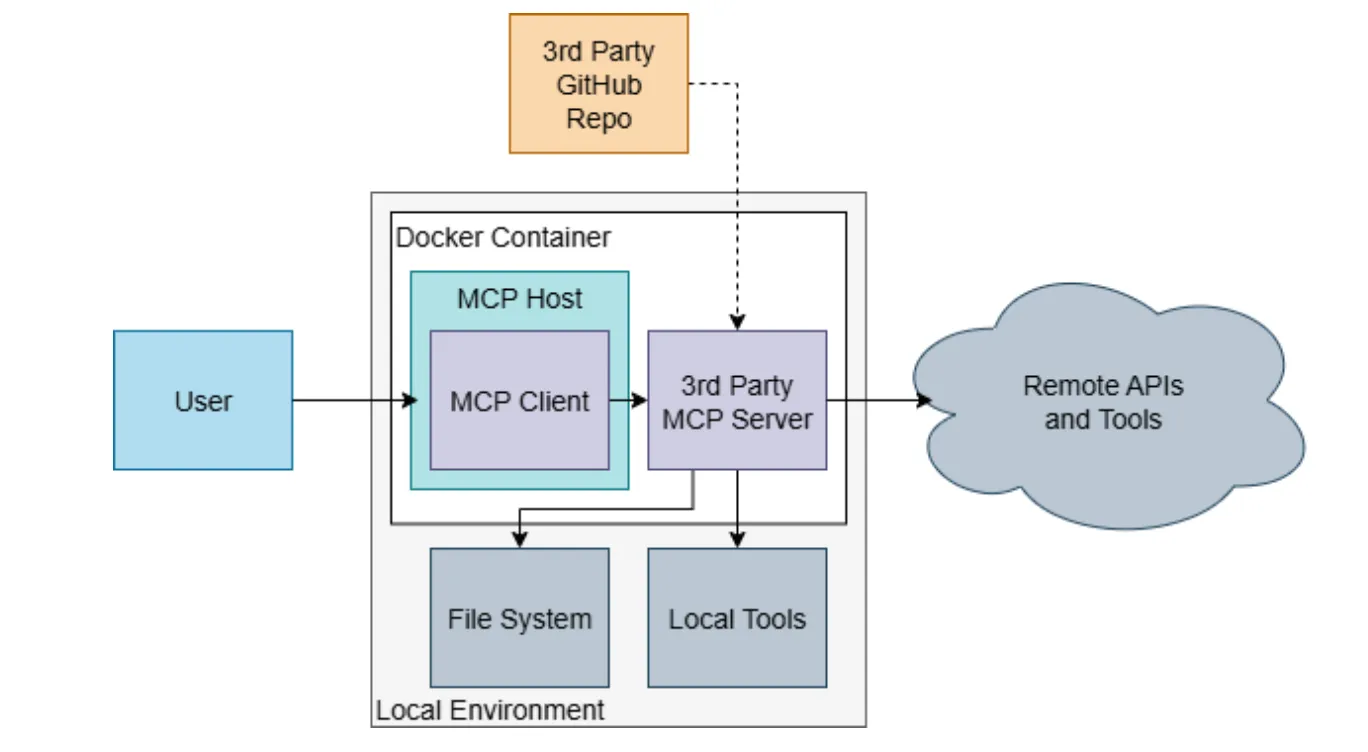
The first rule of MCP security is isolation. Never run an MCP server with the same privileges as the host system.
For Local Servers (STDIO):
- Use Docker: Always run third-party MCP servers inside a container. This prevents a compromised server from reading your local SSH keys or accessing your local network.
- Limit Network Access: If a tool only needs to read local files, block its ability to make outbound network calls.
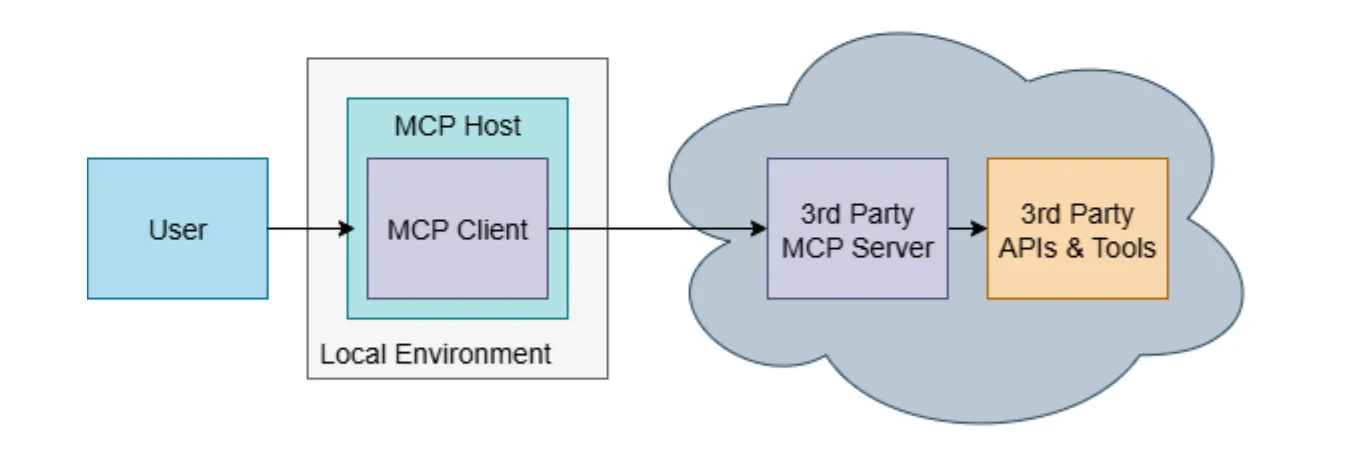
For Remote Servers (HTTP):
- Enforce TLS 1.2+: Never expose an MCP server over plain HTTP.
- Strict Lifecycle Management: Implement deterministic cleanup. When a session ends, the server must flush all file handles, cached tokens, and temporary memory. Don’t let data bleed between sessions.
2. Authentication: Kill the “Token Passthrough”
One of the most critical takeaways from the OWASP guide is the prohibition of Token Passthrough.
The Anti-Pattern: A client sends a raw auth token (e.g., a GitHub PAT) to the MCP server, which then uses it to call the downstream API. This is dangerous because it breaks audit trails and bypasses policies.
The Secure Pattern (Token Delegation):
- Use OAuth 2.1 / OIDC.
- Implement Token Delegation (RFC 8693). The client authenticates to the MCP server, and the MCP server uses an “On-Behalf-Of” flow to request a scoped token for the downstream service.
- Benefit: The downstream service knows exactly who is calling (The MCP Server acting on behalf of User X), allowing for granular policy enforcement.
| Security Aspect | Token Passthrough ❌ | Token Delegation ✅ |
|---|---|---|
| Audit Trail | Broken; direct token use | Complete; MCP server identifier logged |
| Policy Enforcement | Bypassed | Enforced at MCP → downstream service |
| Revocation Response | Hours/days delay | Immediate (cached tokens expire in minutes) |
| Downstream Risk | High; raw token exposed | Low; scoped token with limited lifetime |
| Compliance (SOC 2/GDPR) | Fails; unauditable | Passes; audit trails available |
3. Tool Safety: Trust No One
Tools are the hands of the AI. You must ensure they haven’t been handcuffed to a bomb.
- Cryptographic Manifests: Require signed manifests for tools. Verify the hash at load time to ensure the tool definition hasn’t been altered (Rug Pull protection).
- Schema Validation: Define strict JSON Schemas for inputs and outputs. If the model outputs a parameter that doesn’t match the schema, reject it immediately. Do not try to “fix” it.
- Minimize Exposure: Don’t expose internal metadata or sensitive fields to the model context. Only expose what is strictly necessary for the LLM to understand the tool’s function.
4. Prompt Injection Defense
When an LLM calls a tool, it is susceptible to prompt injection from the data it retrieves.
- Structured Tool Invocation: Force the model to use structured JSON calls rather than free-form text commands.
- Human-in-the-Loop (HITL): For high-stakes actions (e.g.,
delete_database,transfer_funds), the MCP server should pause execution and require explicit confirmation from the user on the client side. - Context Compartmentalization: Reset the session context when the agent switches tasks. This prevents hidden instructions from a previous task (e.g., analyzing a malicious email) from influencing the next task.
Decision: Always use Token Delegation (OAuth 2.1 RFC 8693) for production MCP deployments.
Conclusion: The MCP Security Cheat Sheet
Based on the OWASP “Minimum Bar,” use this checklist before deploying any MCP server.
🔒 Identity & Authentication
- No Token Passthrough: Do not forward raw client tokens. Use OAuth delegation.
- Short-Lived Tokens: Use tokens with minutes-long lifespans, checking revocation lists on every call.
- Strong Auth: Enforce OAuth 2.1/OIDC for all remote connections.
📦 Isolation & Lifecycle
- Containerization: Run the server in a non-root, network-restricted Docker container.
- Session Isolation: Ensure memory and execution contexts are strictly segregated between users.
- Deterministic Cleanup: Flush all temp files and memory when a session terminates.
🛠️ Tooling & Validation
- Schema Enforcement: Validate all inputs and outputs against a strict JSON Schema.
- Sanitization: Treat LLM inputs and tool outputs as untrusted. Sanitize for XSS/Injection.
- Least Privilege: Tools should only have the exact permissions needed (read-only vs. read-write).
🛡️ Governance & Ops
- Secrets Management: Store API keys in a Vault, never in code or logs.
- Audit Logging: Log every tool invocation, but redact sensitive data (PII/Secrets).
- Supply Chain: Pin tool versions and verify cryptographic signatures.
To further enhance your cloud security and implement Zero Trust, contact me on LinkedIn Profile or [email protected]
Frequently Asked Questions (FAQ)
What is the Model Context Protocol (MCP)?
MCP is a standardized protocol that connects AI agents and LLMs to external tools, data sources, and APIs, enabling them to perform complex, autonomous tasks.
Why is Token Passthrough dangerous in MCP?
Token Passthrough involves sending raw client tokens to the MCP server. This bypasses security policies, breaks audit trails, and increases the impact of a potential breach.
What is Tool Poisoning?
Tool Poisoning is an attack where a threat actor modifies a tool's definition or functionality, tricking the AI into executing malicious logic under the guise of a legitimate operation.
How can I protect against Prompt Injection in MCP?
Use structured tool invocations (JSON), implement Human-in-the-Loop (HITL) for critical actions, and rigorously compartmentalize session contexts to prevent cross-task contamination.
What is the Confused Deputy problem in AI?
It occurs when an MCP server uses a user's credentials to perform actions that the user didn't intend or shouldn't be authorized to do, often triggered by a malicious prompt.
Resources
- OWASP GenAI Security Project: https://genai.owasp.org
- MCP Protocol Documentation: https://modelcontextprotocol.io
